Nota:
Este artículo se aplica a los avisos de seguridad de nivel de repositorio en un repositorio público. Para editar un aviso global en GitHub Advisory Database, consulte Edición de avisos de seguridad en la base de avisos de GitHub.
Prerrequisitos
Antes de que puedas colaborar en una bifurcación privada temporal, debes crear un borrador de asesoría de seguridad. Para más información, consulta Creación de un aviso de seguridad de repositorio.
Crear una bifurcación privada temporal
Para garantizar la seguridad de la información sobre vulnerabilidades, las integraciones, entre las que se incluye CI, no pueden acceder a las bifurcaciones privadas temporales.
-
En GitHub, navegue hasta la página principal del repositorio.
-
En el nombre del repositorio, haga clic en la Security and quality pestaña . Si no puede ver la pestaña " Security and quality", seleccione el menú desplegable y, a continuación, haga clic en Security and quality.
-
En la barra lateral de la izquierda, en "Reporting", haz clic en Advisories.
-
En la lista "Avisos de seguridad", haz clic en el nombre del aquel en el que quieres crear una bifurcación privada temporal.
-
Desplázate hasta la parte inferior del formulario de avisos y haz clic en Iniciar una bifurcación privada temporal.

Se crea una bifurcación privada del repositorio y se muestra en la página del aviso.
La convención de nomenclatura de la bifurcación privada es muy similar a la que se usa para avisos en GitHub Advisory Database y sigue este formato:
repo-ghsa-xxxx-xxxx-xxxx, donde:repoes el nombre del repositorio. Para mantenerse por debajo del límite de 100 caracteres en los nombres de repositorio, truncamos el nombre del repositorio original en 80 caracteres.xxxx-xxxx-xxxxes el identificador único del borrador de aviso de seguridad:xes una letra o un número del siguiente conjunto:23456789cfghjmpqrvwx.- Los números y letras se asignan aleatoriamente.
- Todas las letras y los números están en minúsculas.

Por ejemplo, si crea una bifurcación privada temporal en un repositorio denominado octocat-repo y el identificador generado automáticamente para el borrador del aviso es GHSA-x854-cvjg-vx26, la bifurcación temporal se denominará octocat-repo-ghsa-x854-cvjg-vx26.
También puedes usar la API de REST para crear bifurcaciones privadas temporales. Para obtener más información, consulte Creación de una bifurcación privada temporal en la documentación de la API de REST.
Añadir colaboradores a una bifurcación privada temporal
Cualquiera con permisos de administrador en una asesoría de seguridad puede añadir colaboradores adicionales a la misma, y estos pueden acceder a la bifurcación privada temporal. Para más información, consulta Incorporación de un colaborador a un aviso de seguridad de repositorio.
Agregar cambios a una bifurcación privada temporal
Cualquier persona con permisos de escritura para un aviso de seguridad puede colaborar en una revisión confirmando los cambios en una bifurcación privada temporal.
-
En GitHub, navegue hasta la página principal del repositorio.
-
En el nombre del repositorio, haga clic en la Security and quality pestaña . Si no puede ver la pestaña " Security and quality", seleccione el menú desplegable y, a continuación, haga clic en Security and quality.
-
En la barra lateral de la izquierda, en "Reporting", haz clic en Advisories.
-
En la lista "Avisos de seguridad", haz clic en el nombre de aquel en el que quieres trabajar.
-
Puede realizar los cambios en GitHub o localmente:
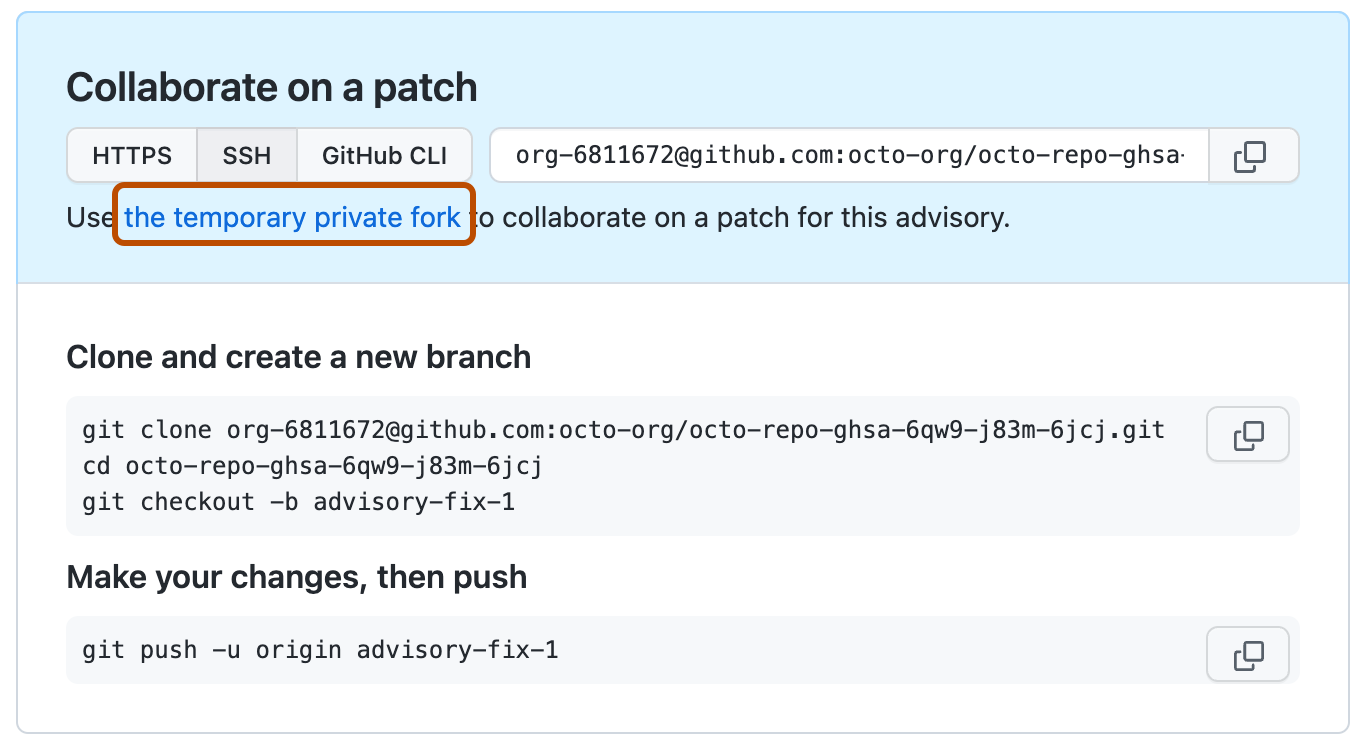
- Para hacer cambios en GitHub, en "Colaborar en una revisión", haga clic en la bifurcación privada temporal. Luego, crea una nueva rama y edita los archivos. Para más información, consulta Gestión de ramas en tu repositorio y Editar archivos.
- Para añadir cambios localmente, sigue las instrucciones descritas en "Clonar y crear una nueva rama" y "Haz tus cambios, posteriormente, súbelos".

Crear una solicitud de extracción desde una bifurcación privada temporal
Cualquier persona con permisos de escritura para un aviso de seguridad puede crear una solicitud de extracción desde una bifurcación privada temporal.
-
En GitHub, navegue hasta la página principal del repositorio.
-
En el nombre del repositorio, haga clic en la Security and quality pestaña . Si no puede ver la pestaña " Security and quality", seleccione el menú desplegable y, a continuación, haga clic en Security and quality.
-
En la barra lateral de la izquierda, en "Reporting", haz clic en Advisories.
-
En la lista "Avisos de seguridad", haz clic en el nombre del aquel en la que quieres crear una solicitud de incorporación de cambios.
-
Desplázate hasta el final del formulario de aviso. A continuación, en "Colaborar en una revisión", haga clic en Comparar y solicitar incorporación de cambios para crear una solicitud de incorporación de cambios para la rama asociada.

- Para crear una solicitud de incorporación de cambios que esté lista para revisión, haga clic en Crear solicitud de incorporación de cambios. Para crear un borrador de una solicitud de incorporación de cambios, use el menú desplegable y seleccione Crear solicitud de incorporación de cambios de borrador, y después haga clic en Solicitud de incorporación de cambios de borrador. Si eres miembro de una organización, es posible que tengas que solicitar acceso a las solicitudes de extracción en borrador a un propietario de la organización. Consulta Solicitudes de incorporación de cambios.
No puedes fusionar solicitudes de fusión individuales en una bifurcación privada temporal. En vez de esto, fusionas todas las solicitudes de extracción al mismo tiempo en la asesoría de seguridad correspondiente. Para obtener más información, consulte Fusionar cambios en un aviso de seguridad.
Fusionar cambios en una asesoría de seguridad
Cualquiera con permisos de administrador en una asesoría de seguridad puede fusionar los cambios en la misma.
No puedes fusionar solicitudes de fusión individuales en una bifurcación privada temporal. En vez de esto, fusionas todas las solicitudes de extracción al mismo tiempo en la asesoría de seguridad correspondiente.
Antes de que puedas fusionar cambios en una asesoría de seguridad, cada solicitud de extracción abierta en la bifurcación privada temporal debe ser fusionable. Para garantizar la seguridad de la información sobre las vulnerabilidades, las verificaciones de estado no ejecutan solicitudes de extracción en bifurcaciones privadas temporales. Para más información, consulta Acerca de las ramas protegidas.
Además, no puede haber conflictos de fusión, y GitHub no aplicará ninguna de las reglas de protección que haya configurado para la rama en la que intenta fusionar los cambios.
- En GitHub, navegue hasta la página principal del repositorio.
- En el nombre del repositorio, haga clic en la Security and quality pestaña . Si no puede ver la pestaña " Security and quality", seleccione el menú desplegable y, a continuación, haga clic en Security and quality.
- En la barra lateral de la izquierda, en "Reporting", haz clic en Advisories.
- En la lista "Avisos de seguridad", haz clic en el nombre de aquel que tiene los cambios que quieres fusionar.
- Desplázate hasta el final del formulario de aviso. A continuación, en "Este aviso está listo para combinarse", haz clic en Combinar solicitudes de incorporación de cambios para combinar todas las solicitudes de incorporación de cambios abiertas en la bifurcación privada temporal.

Nota:
Solo puede combinar una solicitud de incorporación de cambios en la rama main de una bifurcación privada temporal. Si más de una solicitud de incorporación de cambios tiene como destino la rama main, la combinación se bloquea.
Después de que fusiones cambios en una asesoría de seguridad, puedes publicarla para alertar a tu comunidad sobre las vulnerabilidades de seguridad en versiones previas de tu proyecto. Para más información, consulta Publicación de un aviso de seguridad de repositorio.